
2026 - ISO-27001: employee device compliance monitoring
Status: Approved.
Setup: Windows, Linux, and macOS · Android · iPhone and iPad.
Approved proposal
Section titled “Approved proposal”Problem Statement
Section titled “Problem Statement”Our current endpoint posture is Bring Your Own Device (BYOD) governed by self-attestation. The BYOD policy asks employees to keep personal devices patched weekly, run antivirus, set a strong password, and enable a 5-minute auto-lock - but nothing verifies any of this, and we hold no evidence that the controls are actually in place on any given device.
During our internal ISO-27001 review, the reviewer flagged that this self-attested BYOD posture probably will not pass an external ISO-27001 audit - it does not provide all of the auditable endpoint-control evidence ISO-27001 Annex A expects (endpoint hardening, configuration management). We have no system of record that can answer “is every device that touches company data encrypted, patched, and screen-locked right now?” with evidence rather than a signed acknowledgement.
This is a potential compliance blocker, not a tooling preference. We need to decide our device-management posture and shape it into something the ISO reviewer will sign off on - before the external audit takes place.
- ISO sign-off: reach a posture the ISO-27001 internal reviewer confirms provides adequate Annex A endpoint-control coverage, with audit evidence - i.e. the reviewer’s BYOD objection is resolved, not deferred.
- Evidence: every in-scope device reports its actual compliance state (disk encryption, screen lock, OS patch level, firewall) continuously and queryably - replacing the weekly self-attestation gap.
- A written privacy line: a clear, acknowledged statement of exactly what is and isn’t collected from any device an employee uses - especially if personal devices stay in scope.
- Decide or explicitly defer within 4 weeks, so the audit timeline isn’t blocked by an open-ended debate.
What this means for your devices
Section titled “What this means for your devices”If you just want to know how this affects you: the table below is what Fleet can and cannot see on a device you use for work, by platform. It checks that the device is secure (encrypted, patched, screen-locking). It is not productivity surveillance.
How a device reports in differs by platform: Mac, Windows, and Linux run the Fleet agent (osquery) and report the most detail. Android phones use Android Enterprise work profiles. iPhones / iPads are proposed for Apple Business User Enrollment, pending a pilot. Phone management and reporting differ from desktop agents; the selected enrollment method determines the privacy boundary.
Legend: ✅ monitored · ❌ not monitored.
| Signal | Android | iOS / iPad | Windows | Linux | Mac |
|---|---|---|---|---|---|
| Device model, OS version, patch level | ✅ | Planned | ✅ | ✅ | ✅ |
| Disk encryption on/off | Work-profile protection; device-wide status varies | Validate in pilot | ✅ | ✅ | ✅ |
| Compliance checks (encryption, screen lock, firewall, patched) | Supported MDM settings only | Supported MDM settings; pilot pending | ✅ | ✅ | ✅ |
| Installed apps | Work-profile inventory | Managed apps; pilot pending | ✅ | ✅ | ✅ |
| Browser extensions installed | ❌ | ❌ | ✅ | ✅ | ✅ |
| Which local accounts exist & who is logged in | ❌ | ❌ | ✅ | ✅ | ✅ |
| Network IP addresses & open ports | ❌ | ❌ | ✅ | ✅ | ✅ |
| USB devices plugged in | ❌ | ❌ | ✅ | ✅ | ✅ |
| Your browsing history (the pages you visit) | ❌ | ❌ | ❌ | ❌ | ❌ |
| Activity on your screen / screenshots | ❌ | ❌ | ❌ | ❌ | ❌ |
| What other users do on the machine | ❌ | ❌ | ❌ | ❌ | ❌ |
| Keystrokes (what you type) | ❌ | ❌ | ❌ | ❌ | ❌ |
| Camera or microphone | ❌ | ❌ | ❌ | ❌ | ❌ |
| Your physical location | ❌ | ❌ | ❌ | ❌ | ❌ |
| Contents of your files, photos, or downloads | ❌ | ❌ | ❌ | ❌ | ❌ |
| Contents of your email, chats, or messages | ❌ | ❌ | ❌ | ❌ | ❌ |
| Your passwords | ❌ | ❌ | ❌ | ❌ | ❌ |
We see which browser extensions are installed, never your history. We see which accounts exist and who is logged in, never what those people do.
On phones specifically: Android work-profile management is live in Fleet. For iPhone/iPad, we propose Apple Business Account-driven User Enrollment, which limits management to the work account and managed apps. Fleet Free’s enrollment-link flow is broader Device Enrollment and is not an equivalent privacy boundary. Validate the proposed Apple setup and its actual data visibility with a participant before rollout. The data captured by Fleet today is shown in Appendix A.
Proposed Design
Section titled “Proposed Design”We have approved Option A — company-managed devices in Fleet (free, self-hosted) as our endpoint posture. The alternatives below remain as the decision record. Fleet Premium is excluded. Apple Business setup and validation for personal iPhones/iPads remain implementation work.
Recommendation — Option A
Section titled “Recommendation — Option A”Option A -Company-managed devices in Fleet (free, self-hosted). Devices that interact with company data are covered by the approved management program: Fleet for computers and Android, and a separate Apple Business pilot for personal iPhones/iPads. Desktop policies report compliance; phone enforcement depends on the MDM settings supported by each enrollment method. Fleet is an open source endpoint management tool. We have a prototype self hosted at https://devices.cadence15.com, protected by Cloudflare Zero Trust (on that domain because the anti-robot rules on c15.io conflicted with the Fleet agents).
This is likely the least invasive approach assuming we do implement a UEM (unified endpoint management) tool, and as a bonus we fully manage it in house, so we have control over the data. The appendix of this documents shows screenshots demonstrating what data is captured. The basic/free version of Fleet is missing features that Fleet premium adds (including e.g. capture of the logged in user of phones, additional policies, etc). The cost of self hosting is that we have to maintain the instance, pull in patches periodically, etc.
Rollout steps:
- Roll out Fleet to a beta group of 5 people
- Test for 2 weeks, and have each person review what the system knows about their devices
- Barring blockers, proceed
Risks & escape hatch: the main risk is privacy overreach on personal devices. The guardrails are the beta’s per-person review of exactly what the system can see, and the chosen phone enrollment methods (Android work profiles; Apple User Enrollment proposed); “barring blockers, proceed” is the explicit stop, and a beta is fully reversible (uninstall the agent). Self-hosting carries an ongoing maintenance cost (patching the instance), accepted in exchange for keeping device data in-house.
How we’ll know it worked: the ISO-27001 reviewer confirms adequate Annex A endpoint-control coverage with audit evidence (Goal 1), and every in-scope device reports its live compliance state (Goal 2) - with no beta participant raising a privacy blocker they couldn’t live with.
Alternatives considered
Section titled “Alternatives considered”Option B - Fleet premium self hosted, or Fleet cloud. Essentially, the same is Option A but we pay Fleet in some manner, either so that we get extra features, or so that we don’t have to self-host, or both. There are limited pros here - more interesting info about our devices can be captured and tested, and we potentially don’t need to self-host. Downside: more spend, more data captured.
Option C - SaaS MDM (Jamf / Kandji / Intune / …). Turnkey full-UEM enforcement and a vendor compliance story, at the cost of subscription + a new subprocessor. Upside: maybe better integration / reporting. Downside: cost, lose control of our device data.
Option D - Status quo (self-attested BYOD). Documented here so the “no” is captured, not silent: this is the option the ISO reviewer has already said won’t pass. Listed as the do-nothing baseline the other options must beat, not a live choice.
Advice Process
Section titled “Advice Process”Decision: Approved. Proceed with the rollout and validation steps above.
Appendix A - Fleet, running today
Section titled “Appendix A - Fleet, running today”These are screenshots of our live self-hosted Fleet deployment (devices.cadence15.com),
included to show the scope of data captured.
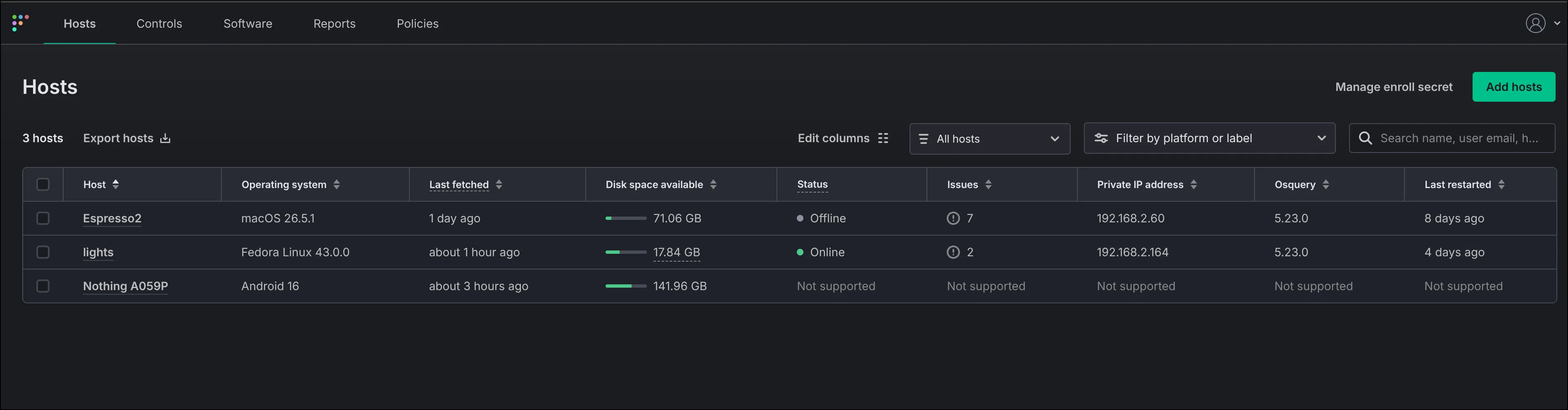
- Hosts inventory: each device with OS, last check-in, disk space, open issues, and osquery agent version. Android shows “Not supported” for osquery-only columns.*
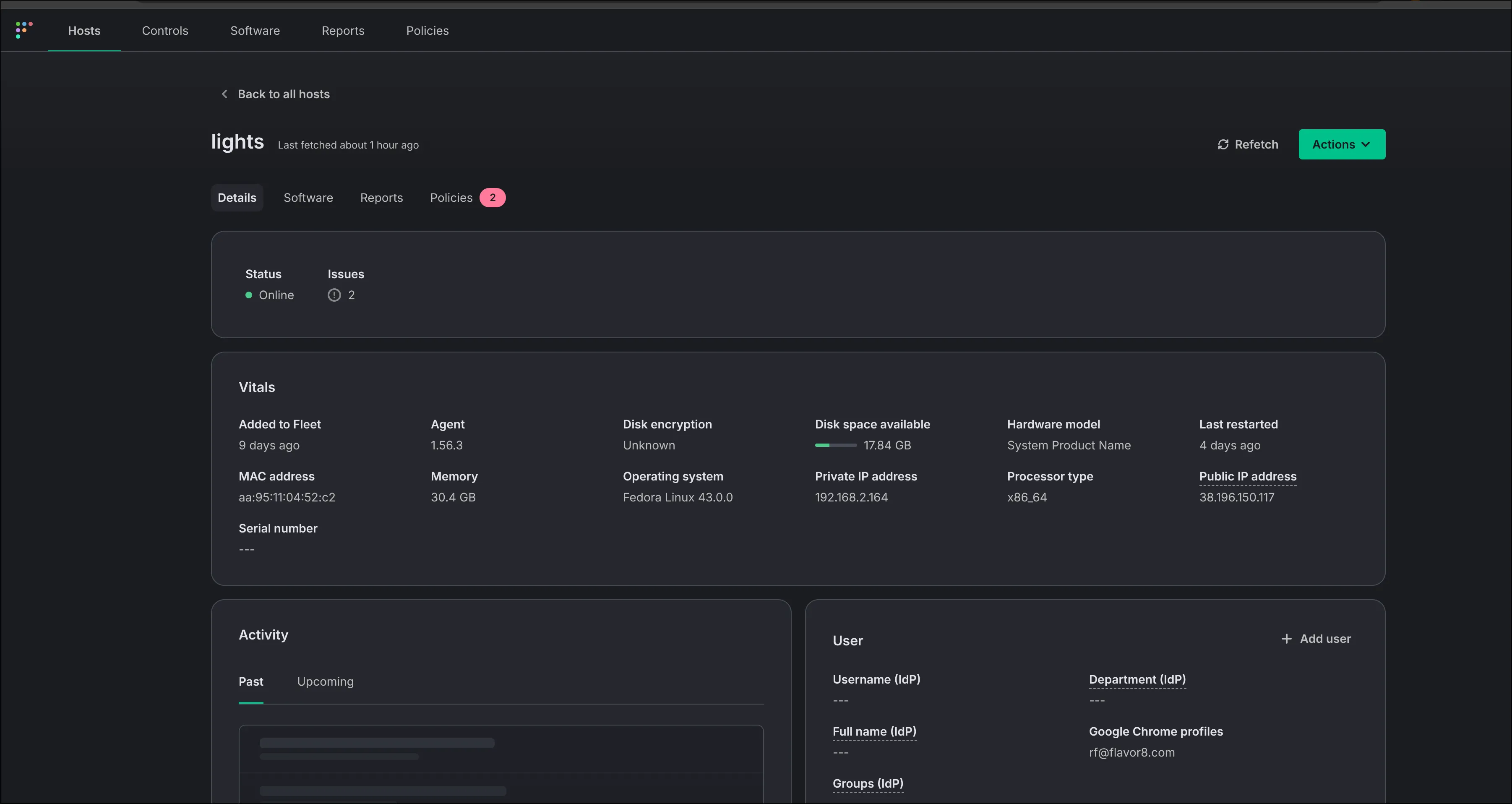
Per-host vitals: disk encryption state, OS version, MAC/IP, hardware, last restart — the asset-inventory evidence ISO asks for.
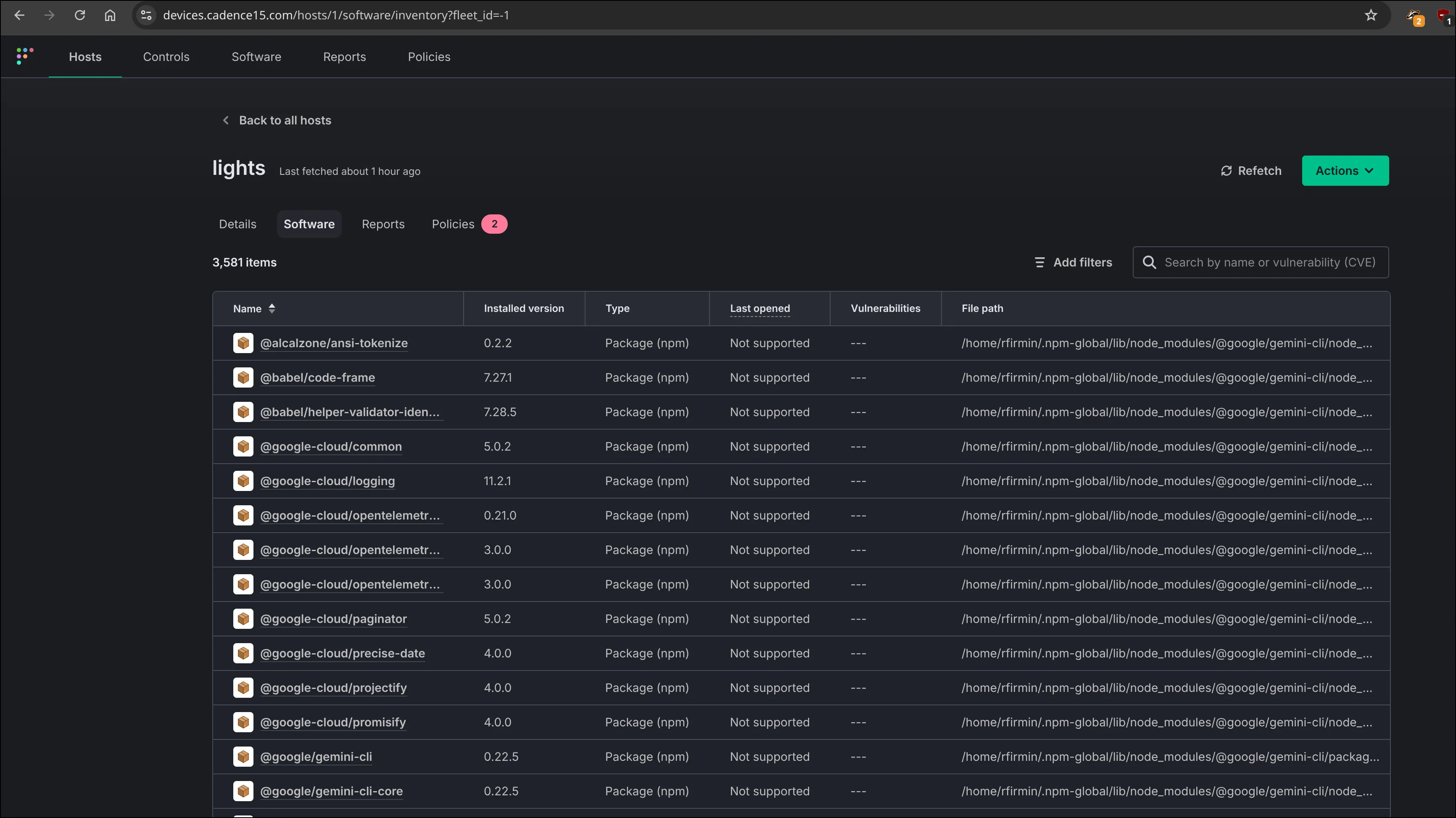
Full installed-software inventory per host (2,581 packages here), with versions and file paths — supports vulnerability management.
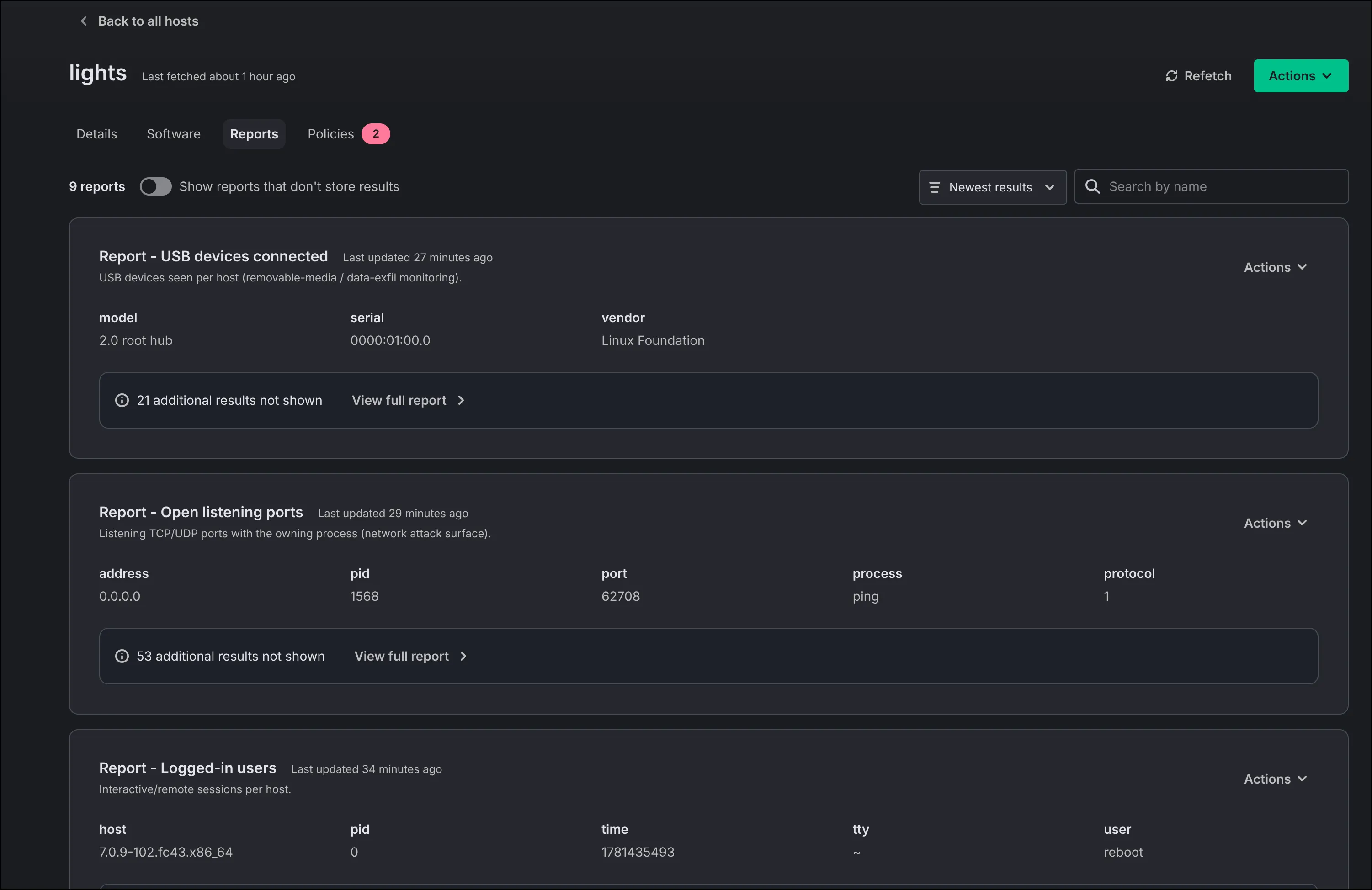
Reports: USB/removable-media (data-exfil), open listening ports (attack surface), interactive/remote sessions.
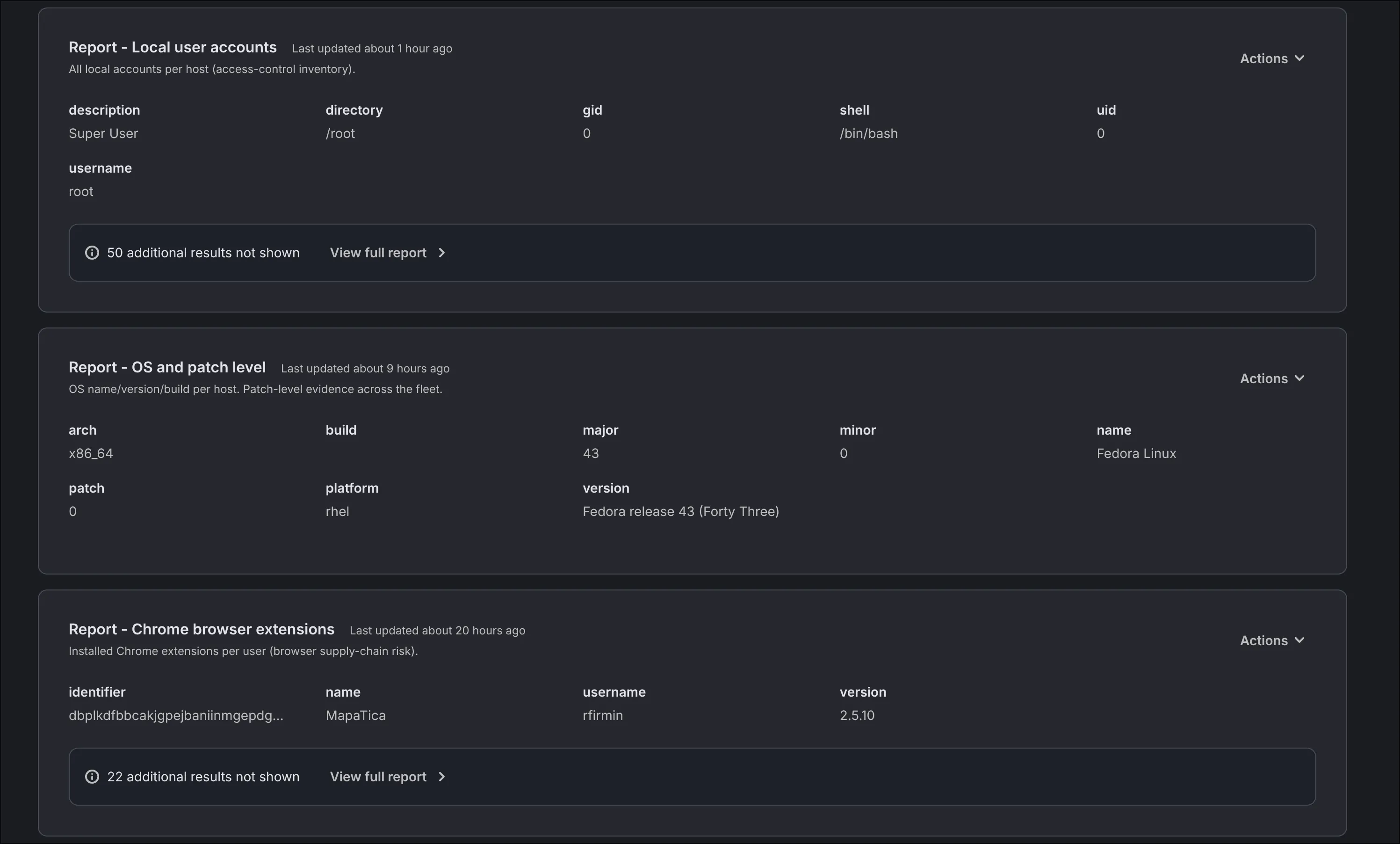
Reports: local user accounts, OS name/version/build (patch-level evidence), installed Chrome extensions (browser supply-chain risk).
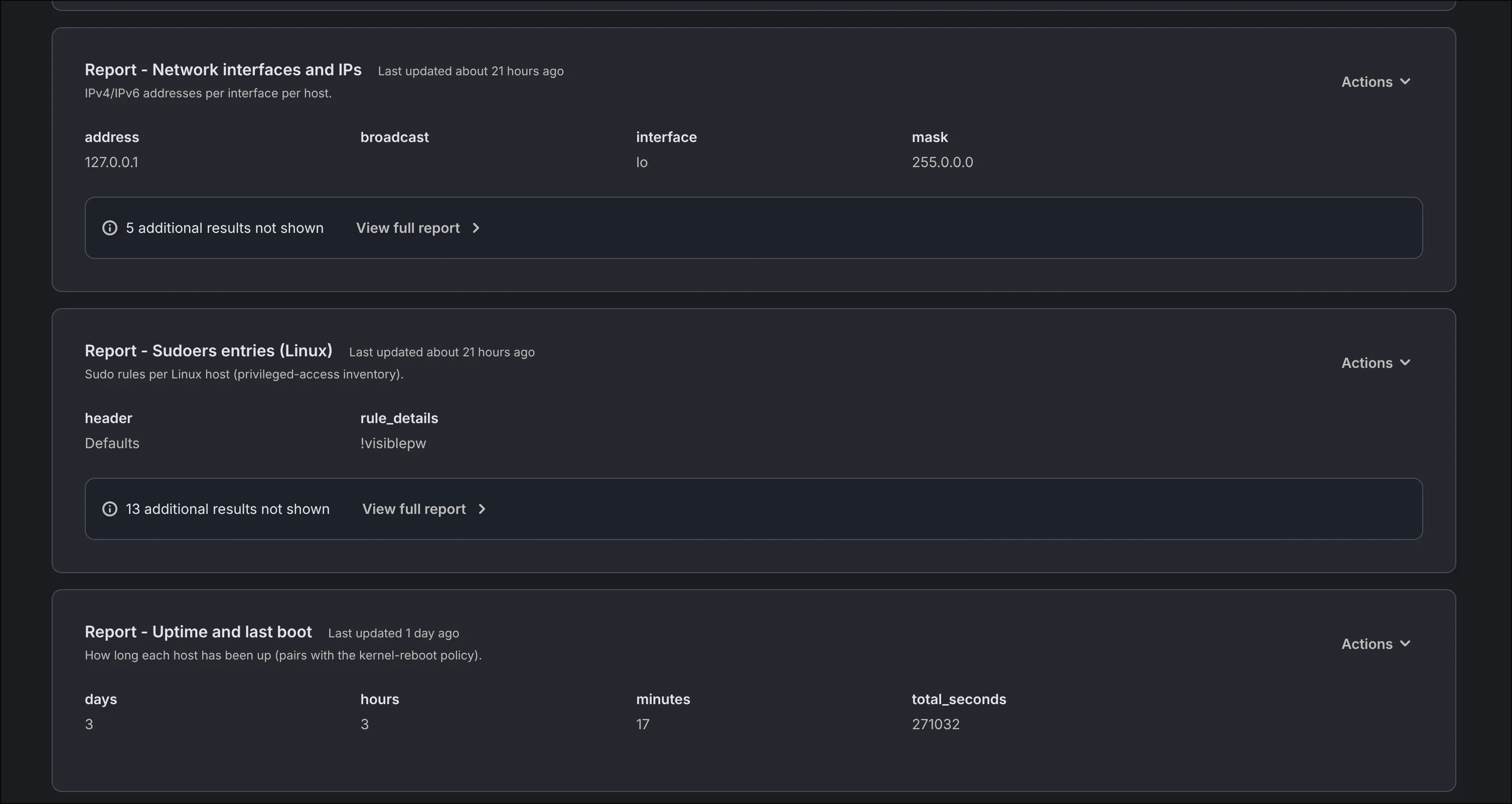
Reports: network interfaces/IPs, sudoers entries (privileged-access inventory), uptime/last boot (pairs with the kernel-reboot policy).
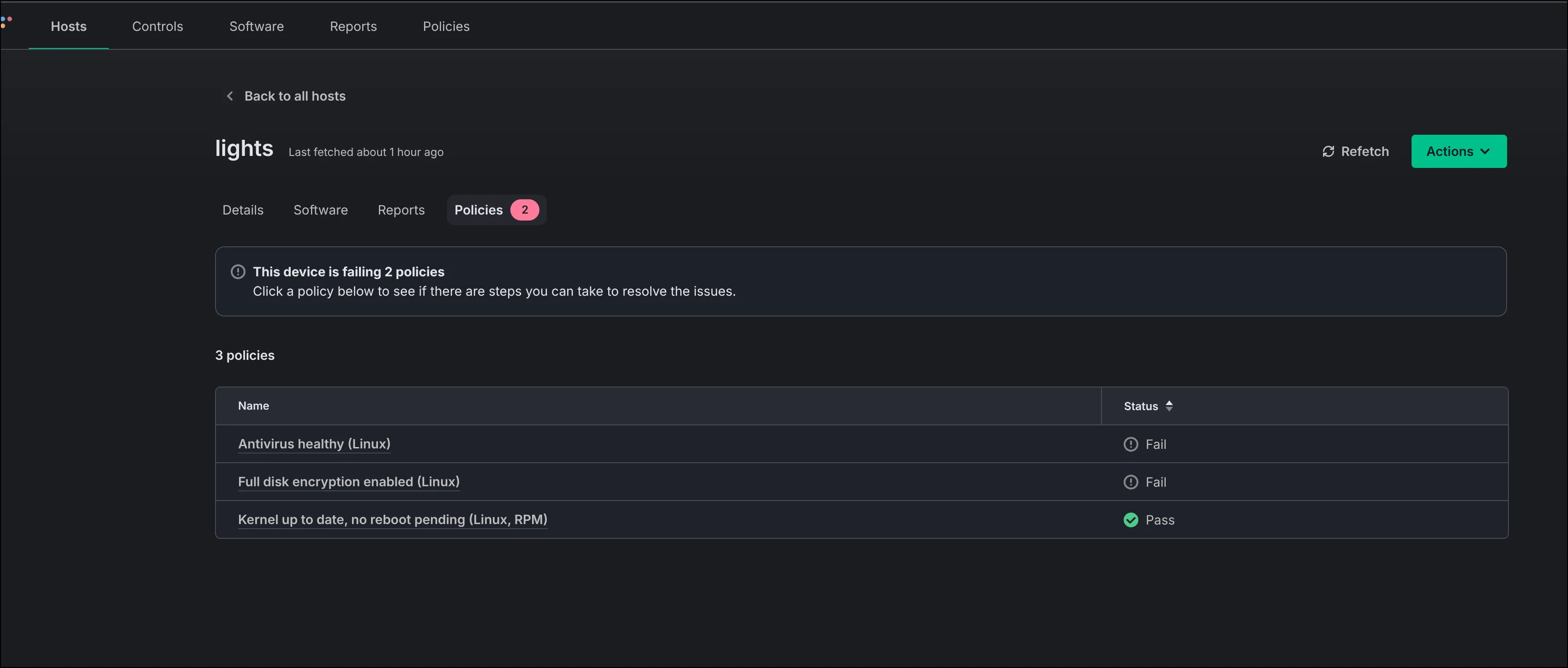
Compliance policies evaluated per device: antivirus healthy (Fail), full-disk encryption (Fail), kernel up-to-date (Pass). This is verified compliance, not self-attestation.
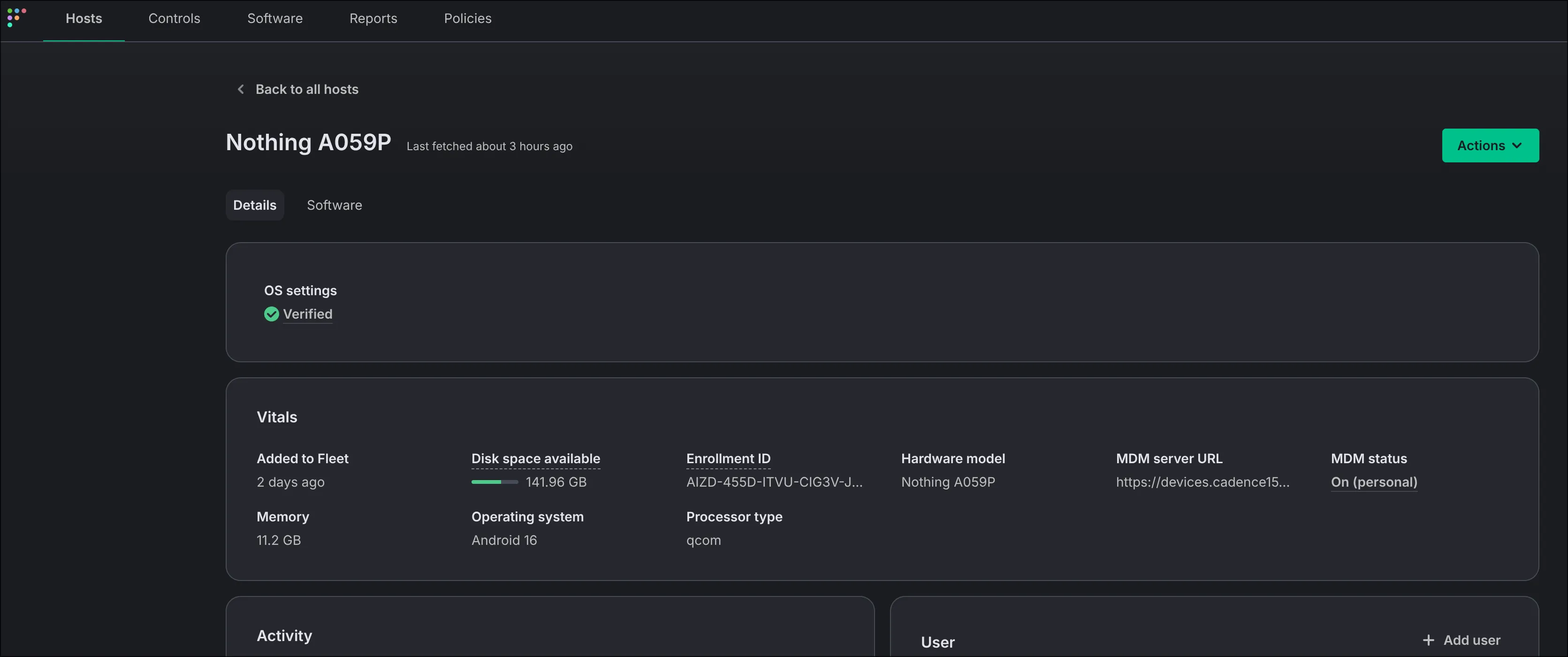
Android device under Android Enterprise MDM: OS settings “Verified”, enrollment ID, MDM status “On (personal)” — work-profile management of a personal phone.
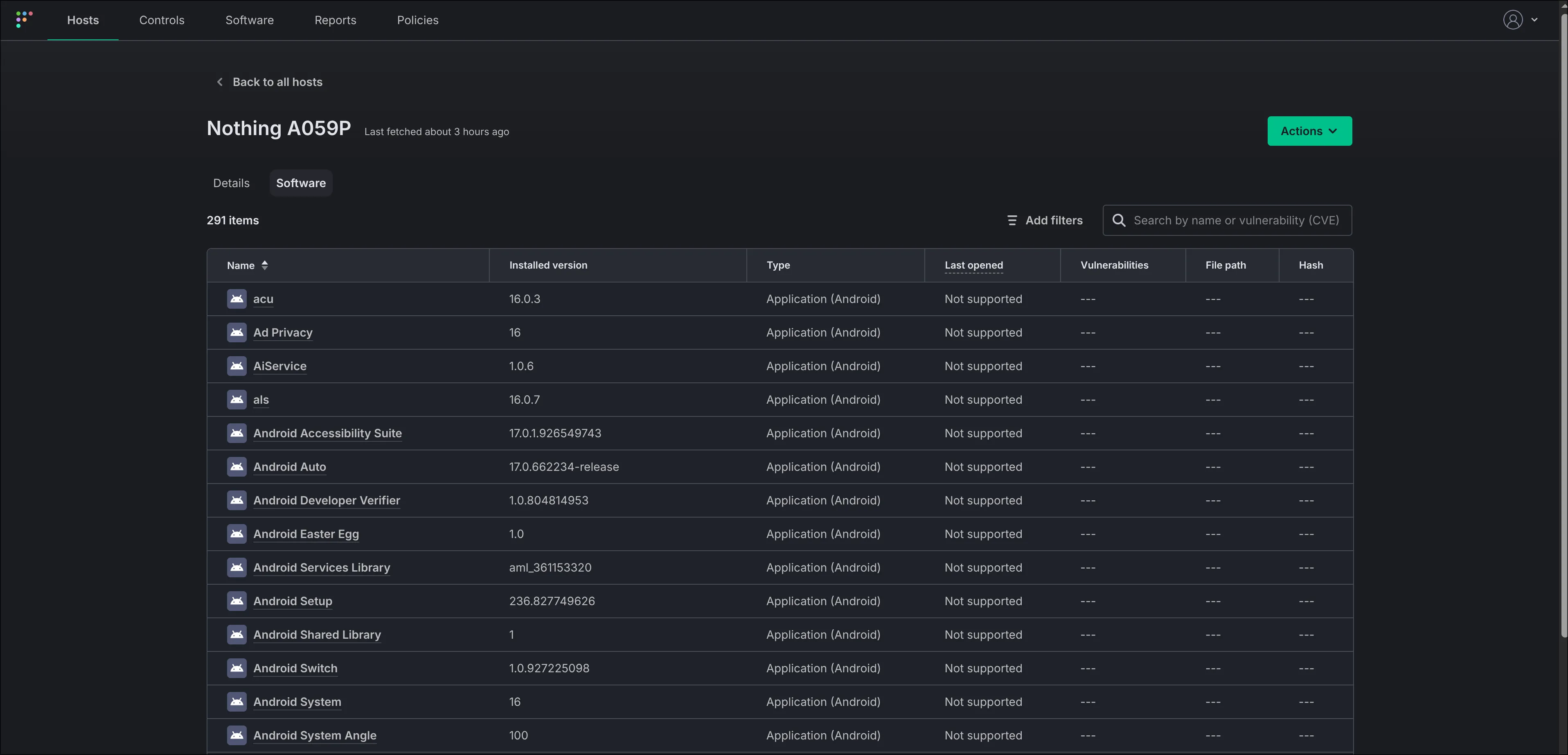
Installed-application inventory on the managed Android device (291 apps). NOTE this only shows apps in the work profile, i.e. personally installed apps are not shown here.