
Git Workflow Backgrounder
This backgrounder outlines common workflow approaches to provide context as we periodically evaluate our git workflow so that we can work collaboratively, transparently, and autonomously to produce high-quality product.
Business Requirements and Compliance Considerations
Section titled “Business Requirements and Compliance Considerations”Our Git workflow must satisfy specific business, security, and compliance requirements while embodying our horizontal practices.
SOC2 Compliance Requirements
Section titled “SOC2 Compliance Requirements”Our SOC2 certification imposes several requirements influencing our Git workflow:
- Change Management: All changes to production code follow a documented approval process
- Access Control: Clear separation between development and production environments
- Audit Trail: Comprehensive logging of all code changes and deployments
- Security Testing: Code undergoes security review before deployment
- Documentation: Processes are well-documented and followed consistently
- Data Handling Requirements:
- No PII in Development: We strictly avoid using personally identifiable information during development
- Production Data Testing: We use anonymized production data for testing and development
- Data Separation: Clear separation between development environments and production data
QA Process Requirements
Section titled “QA Process Requirements”- Mirror Environment: We maintain a copy of production code available for QA and demo at all times. This enables us to see “production” behavior without violating our SOC2 requirement of keeping strict separation between develompent and production.
- Release Candidate Staging: We conduct end-to-end testing prior to release, so we have to maintain a staging environment capable of supporting such testing.
- PR / Ticketing: As part of our strategy for meeting our SOC2 audit trail requirement, every PR must be reviewed and the reason for the PR must be clear – usually by referencing the ticket.
Common Git Workflow Topologies
Section titled “Common Git Workflow Topologies”1. GitHub Flow
Section titled “1. GitHub Flow”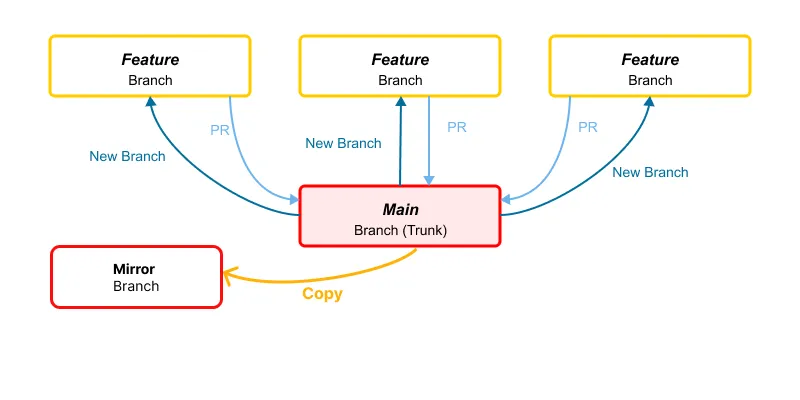
Production Branch: Main
Key Characteristics
Section titled “Key Characteristics”- Single primary
Mainbranch (trunk) containing production code - Feature branches that branch from and merge back to Main via Pull Requests
Workflow Process
Section titled “Workflow Process”- Create feature branches from Main
- Complete work in these branches
- Open Pull Requests for code review
- Upon approval, features merge directly to Main
- Deployment happens automatically from Main
Best For
Section titled “Best For”- Small, high-trust teams
- Projects requiring continuous deployment
- Codebases where features can be completed quickly
Limitations
Section titled “Limitations”- Less formal control over releases
- Not ideal for managing multiple production versions
- Can be challenging for complex, longer-duration features
2. Trunk-Based Development
Section titled “2. Trunk-Based Development”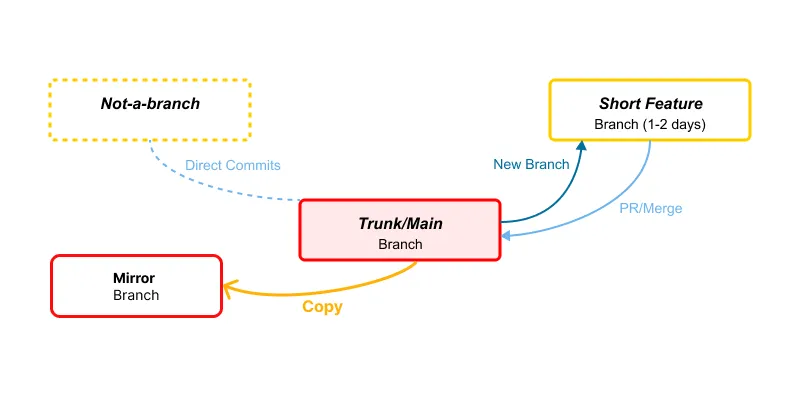
Production Branch: Main
Key Characteristics
Section titled “Key Characteristics”- Single
Mainbranch serving as both integration and production branch - Very short-lived feature branches (explicitly limited to 1-2 days)
- Option for direct commits to trunk for minor changes
Workflow Process
Section titled “Workflow Process”- Create short-lived branches from Main
- Make small, focused changes and test them
- Quickly merge back to Mainvia PR/Merge
- Commit minor changes directly to Main
- Deployment happens from Main, often using feature flags
Best For
Section titled “Best For”- Teams practicing continuous integration
- Projects with frequent, small releases
- Experienced development teams with good testing practices
- Organizations with strong DevOps capabilities
Limitations
Section titled “Limitations”- Requires disciplined development practices
- Needs comprehensive automated testing
- Often requires feature flagging infrastructure
- May be challenging for junior developers
3. GitLab Flow [Our topology as of Dec 2025]
Section titled “3. GitLab Flow [Our topology as of Dec 2025]”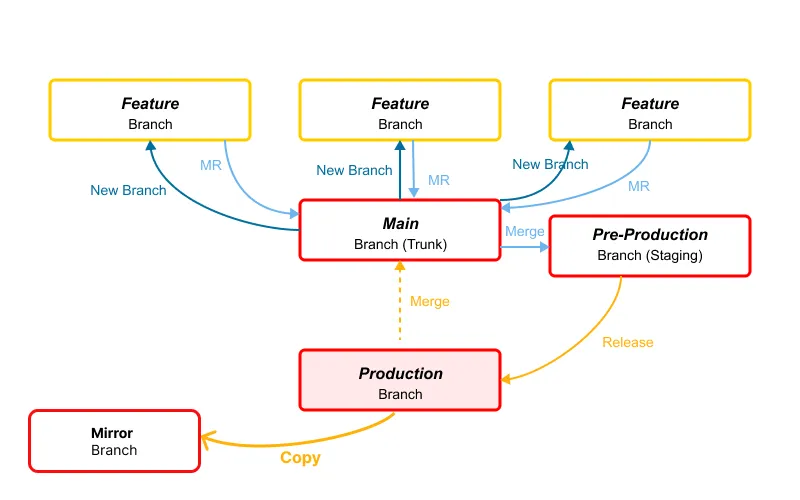
Production Branch: Production
Key Characteristics
Section titled “Key Characteristics”Mainbranch as the integration branchPre-Production(staging) branch for testingProductionbranch containing deployed code- Feature branches that merge to Main via Merge Requests
Workflow Process
Section titled “Workflow Process”- Create feature branches from Main
- Merge changes back to Main via MR
- Merge Main to Pre-Production for testing
- Release Pre-Production to Production when ready
Best For
Section titled “Best For”- Teams needing explicit environment separation
- Projects requiring thorough testing before release
- Organizations with formal QA processes
- Multi-environment deployment pipelines
Limitations
Section titled “Limitations”- More complex branch management
- Possible drift between environments
- Requires more coordination between teams
- Slightly slower path to production than simpler models
4. GitFlow
Section titled “4. GitFlow”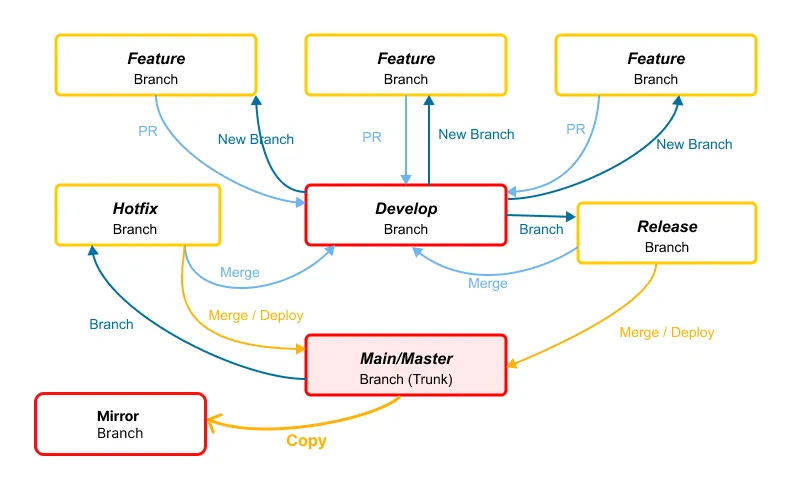
Production Branch: Main/Master
Key Characteristics
Section titled “Key Characteristics”- Two main long-lived branches:
Main/Master(production) andDevelop(integration) - Feature branches that branch from and merge to Develop
- Release branches for preparing releases
- Hotfix branches for emergency production fixes
Workflow Process
Section titled “Workflow Process”- We create feature branches from Develop
- We merge features back to Develop via PR
- When ready for release, we create a Release branch from Develop
- We test and finalize Release branches
- We merge Release branches to both Main (for deployment) and back to Develop
- Hotfixes branch from Main and merge to both Main and Develop
Best For
Section titled “Best For”- Larger teams working on complex projects
- Software with scheduled, versioned releases
- Projects requiring support for multiple versions
- Teams with formal release processes
Limitations
Section titled “Limitations”- Highest complexity of all workflows
- Can lead to long-lived branches and merge conflicts
- Slower release cycle
- More overhead for coordination